Friday, April 25, 2008

Filtering Google Searches By Freshness

One of the more useful Google advanced search features is the date filter, which limits results to recent pages. Results can be limited to the past day, week, month, year, etc. Google’s Matt Cutts and GoogleOperatingSystem wrote about it late last year.


You can access the search via the URL as well, by simply adding “&as_qdr=d” to the end of any query (Apple v. Apple in last day). simply change the =d to d5 for 5 days, or w5 for five weeks, or y5 for 5 years, etc. With Google indexing sites so regularly now, it would be great if they let users refine searches down to the hour as well.


One other thing I like about the feature is that once you’ve searched by date, it stays as an option next to the search bar for that session, so you don’t have to keep adding it.


Google may also be testing date searches with some users even without them voluntarily setting it. Our Israel correspondent Roi Carthy resports that it appeared in one of his searches without him using the URL string or advanced search. A quick poll to my Twitter followers asking if anyone saw it yielded mixed results. A few people said they saw it without setting advanced search, but they may have just seen it stay in the session after they set it.


If anyone sees the data box in Google search and they didn’t set the URL string or advanced search, please let us know in the comments. And try to take a screen shot that includes the entire URL string, preferably even before you’ve done a search.

Something about Google Earth 4.3

Google Earth lets you fly anywhere on Earth to view satellite imagery, maps, terrain, 3D buildings and even explore galaxies in the Sky. The new Google Earth 4.3 promises photo-realistic buildings from cities around the world, dawn to dusk views with the Sunlight feature and swoop navigation from outer space to street-level.

You can now enjoy the photo-textured cities and towns, and thousands of user-contributed buildings around the world with greatly improve performance and realism of 3D data. The amazing as well as controversial Street View, a well-known Google Maps feature is now part of Google Earth with version 4.3 and will let you easily find, discover, and plan activities relevant to a location.

Understand more about Street Views in this video

Play with the Sunlight feature and control the sun’s location relative to the Earth. While zoomed into a given city, you can watch the sunrise and sunset! This video explores the amazing new features of Google Earth 4.3.


Things you can do with GOOGLE

Nifty Google Features

Calculate This: You can use Google Calculator to crunch numbers and figure out conversions. Try entering 12*12 and see what happens; you can also run more complex equations, like G*(6e24 kg)/(4000 miles)^2). Google Calculator handles conversions of all types, such as 3 ounces in tablespoons, 16 dollars in euros, or 19999GB to MB.

Find That Number: You can track FedEx, UPS, and U.S. Postal Service shipments just by sticking the tracking number into Google’s search field; do the same with zip and area codes, vehicle IDs, patent numbers, airplane registration numbers, and even UPC codes.

Make Me Special: Google has special search sites just for you. There’s one for Firefox users, another for Linux users, and a spot for those of you who can’t get enough of Microsoft.

Sights on Google: My buddy Leo F. sent a note asking if I wanted to create a quick Web page, or something fairly complex, with just novice skills. “Google Sites is fun to play with,” Leo said, “and even makes a useful Web page, too. Of course, it’s free.”

Ongoing Experiments: If you like poking around with Web tools, you need to explore Google Labs. For instance, Experimental Search gives you five new ways to search, each aimed at tightening and focusing on specific results.

BTW, Goog411 is a Google Labs graduate and a great service.

Alert Me! Google sends me an e-mail every time it sees a new occurrence of “steve bass PC World,” “steve bass PC Annoyances,” or keywords about my various hobbies and interests. If you haven’t tried Google Alerts, you’re missing out on a terrific service.

Hello, Google? If you’re using Firefox and find something cool on the Web, you can use Google Send to Phone to pass the info along to a U.S.-based cell phone. It’s a nifty service that’s really useful for, say, sending a map to a lost buddy. Check the FAQ for details.

Even More Fun With Google

You probably think there’s not much more to say about Google. Nope, there’s still lots.

Start by downloading the Google Cheat Sheet, a two-page PDF with lots of valuable Google shortcuts, search and query examples, and services.

Even better is 55 Ways to Have Fun with Google, a free e-book with Google trivia, games, and nonsense, enough to kill an afternoon (I did). The more I explored, the better I liked this 228-page book. For instance, I wasted time with The Image Quiz, which has you guess the Google search term for a bunch of images. I also picked up a nifty Google magic trick, learned how to find world records, read IRC chat logs people didn’t know were public, and browsed to some very funny Google parody sites, such as UnderGoos, the underwear search site, and Cthuugle, the Lovecraft search engine.

Thursday, April 24, 2008

Google Analytics : New Graphing Options


Sometimes trends can hide pretty well, and one of Google Analytics' jobs is to make the most actionable trends as apparent as possible so you can surface them to your colleagues and management (and get a promotion). And we realize that most management reporting is done in weekly and monthly time buckets.


With that in mind, we've made it even easier for you to use Google Analytics to create clear and effective management dashboards without having to extract data into other programs. You can use the rich Google Analytics UI and present your promotion-worthy numbers in all their vibrant glory by clearly visualizing trends in weekly or monthly units, in addition to day by day. Have fun with this feature! Watch the patterns come into focus.


Let's look at how the weekly and monthly graphing views can be used by comparing them with viewing the data by day, which used to be the only option. It's very interesting to open up one or two years worth of data to look at your site over time. (Click on the images below for larger views.)


Graph by Day


Strategic insights come from analyzing long term trends. This is the default view in Google Analytics. It hints at something interesting going on in terms of Visits on your site.


New: Graph by Week


Try this cool thing. Click on the Week link on top of the graph, it is newly available in your reports! Suddenly it is more clear what the trend in Visits is. Cooler!


New: Graph by Month


Click on Month and you are now really cooking. Months and months of data visually represented in a way that allows you to clearly show a positive trend, highlight the key points, and yes even ask for a bonus.


Of course all other visualization features in Google Analytics are even more useful now as you use these new time buckets. For instance, take a look at the compare to past visualization.


Comparison in Day view


Comparing two different time periods is a great way to get context to your current performance...


New: Comparison by Month


...but you can highlight the trends in your performance much more optimally by simply clicking on the Month link. This works great for your management reporting and moves you into that corner office. :-)


Google's Android Closer To Reality?

The launch of the iPhone (shortly followed by the iPod Touch) seemed to fuel developer's desires to create mobile-specific web applications despite the device's ability to access the entire internet (without the WAP/WML limitations of most mobile devices). Many mobile web users find the wireless application protocol (WAP) too restrictive and slow, greatly limiting what WAP browsers can access on the internet. On the other hand, all mobile devices (even the iPhone) have small screens and excessive scrolling can be annoying (not to mention EDGE speeds until a 3G version is released). Even still, both the iPhone and iPod touch have spurred movement in the mobile web.


Now, with Google's Android platform even closer to reality, developers could find themselves with a new, open source mobile platform to develop apps for (both native and web-based), if the Open Handset Alliance becomes as revolutionary as many are expecting. The news today is that T-Mobile USA is already preparing for the release of an Android handset to hit stores before the end of this year.


Recently, Joe Sims, VP and general manager of T-Mobile's broadband and new business division, stated that not only has he already seen prototypes of the "impressive" Android-based phone, but that T-Mobile "will have more than one product…(The move to an open platform) will be innovation across the board, not just one device."


As far as manufacturers, the T-Mobile prototype spoken of could be from Motorola, Samsung, HTC or LG, as these are the four handset manufacturers that have joined up with Google. Sprint and Verizon are the other major U.S. carriers who are members of the alliance but neither has yet to announce plans for the release of Android devices. This could work out to T-Mobile advantage, as the Deutsche Telekom-owned company has long lagged behind other services in terms of added features (mobile television, high-speed internet, etc.).


Personally, I see the development of the Android platform as a 'step forward' (even if it's not the perfect solution), because the days of carrier restrictions and outrageous prices for upgraded features should end. Who wants to keep paying by the MB for access to a carrier when free wi-fi is available? And who want to pay $5+ to their phone company for each game they download when their are open source developers around the world itching to create fun games and useful apps for people worldwide… for FREE. All they need is the ability, the platform, and some incentive. That is what Google is trying to accomplish, especially considering that they have $10 million up for grabs for developers.


Though what will come of the impending release of Android and compatible handsets is still unknown, it should defintely help garner some change in the mobile market and help further develop a universal mobile web. My only concerns deal with how the change will affect contract terms, the prices of handsets, and monthly rates for the carriers involved.

Offline access comes to Google Docs

Since Google Gears was initially released the most prime candidate for offline access must have been Google Docs.
To have the freedom to edit documents offline, and the flexibility to access documents from anyhwere online or through a mobile device is wonderful. My Google Docs recently got the Gears upgrade enabled. Synchronising documents is quite fast, although I have not yet given the offline access a good trial, the only major lacking feature is the inability to create new documents whilst offline, though this can be easily overcome by creating a few empty documents before going offline and hottong the road. It would be nice to see my Gmail on Google Apps upgraded to the new version, surely in time. Google's rollout of new features to Apps seems to be sporadic and somewhst chaotic at times.

Everything Google

Cool features Google offers to take advantage


Google Earth

"Explore, Search and Discover" reads the homepage for Google Earth. Now the power to search satellite images, maps, foreign lands and any 3D terrain, building, or structure imaginable is just one click away. Going on a vacation? Type in the location and see a street view of the area surrounding your hotel. The images on Google Earth, say of a neighborhood or public building are 1-3 years old via satellite imaging, and some search listings are limited in international countries. The images displayed in Google Earth are not "real time" images. However, the newest version of Google Earth has a time of day option where one can scroll to see the location at any time of day, noon to midnight. The new version also offers a flight simulator feature. Currently Google Earth is available in the free version, Plus version and Pro version. It is also supported in 13 languages, and working towards being accessible in more languages. Google Earth also has searchable astronomical images available.


Google Desktop

The new download from Google makes organizing and searching your computer even easier. Now searching your desktop is as quick as searching the Internet, and the application also allows users to organize their desktop with useful gadgets like personalized searches, e-mail previews, weather, news updates and a handy sidebar that keeps all the gadgets organized. Very similar to Mac's dashboard application, Google Desktop also features smart indexing that organizes web browsing history, and multiple file types.


Google Talk

Google Talk is free. It hosts instant messaging, PC to PC voice calls, gmail notifications and fast file transfers. There is no download needed to use Google Talk and it is accessible on any computer. It can be added to iGoogle, a web-page, and is automatically accessible through any gmail account. Google Talk also allows media previews of videos, URL's and slideshows from multiple media-based sites.


Google Books and My Library

Google Books offers readers access to thousands of titles, and virtually all genres imaginable. This feature allows readers to scroll through and read limited previews of all books, or as much as the copyright holder of each title has released to be seen, by making the books available through PDFs. The Google Book search works by simply typing in a keyword, the title, or author, and a preview of the book covers search results appears. By clicking on a book cover, another page opens that has images of the book front and back, reviews, author info, popular pages, subjects in the book, and links to Amazon.com to buy the book if a reader wishes to have access to the entire book. Users can also create their own personalized library where they can rate, label, review, and organize their own library of favorite book previews.


Google Groups

Now anyone can create a discussion group on any topic fast and hassle free. Google Groups users can discuss topics through e-mail, webpages, and customized discussion boards. Google Group members can share files, and easily share access to a wide variety of info. The newest version of Google Groups is now available with new and improved features: collaborative webpage creation, customization, file sharing and personalized member profiles to learn more about other users in shared groups.


Google Scholar

Although Google Scholar may not be as exhaustive as other scholarly databases, especially those with emphasis in specific subject areas, it offers users "a simple way to broadly search for scholarly literature" spanning a wide variety of disciplines. Google lists the sources for GS: "peer-reviewed papers, theses, books, abstracts and articles, from academic publishers, professional societies, preprint repositories, universities and other scholarly organizations." GS provides links to the full text of much of the searchable scholarly literature. Where the free full text cannot be provided, GS


Google Video

Like Youtube, Google Video allows users to upload and share video content. What makes Google Video special is its search engine, which incorporates results from Google Video itself, youtube, and other third-party websites. According to Google, The Google Video index is "the most comprehensive on the web," making it the most powerful video searching tool currently available.


Google Docs

Free to Google users-Google Docs is a basic and easy to use online word processing, spreadsheet, and presentation application. Google Docs gives users the ability to create new documents or upload existing documents, users can store and share documents online with ease. The most innovative and useful feature in Google docs is real time collaboration. Users can invite people to collaborate on a document, which allows multiple users to edit a single document at the same time. A chat-window keeps track of revisions made and displays which user made specific changes. Google Docs are stored securely online where they are far removed from the risk of computer crashes and accessible from any computer with an Internet connection. Frequent auto-saving mitigates data loss in the event of a browser crashing or disruptions in Internet connections. Docs requiring more advanced features can be exported in popular formats like .doc, .xls, .pdf, and .rtf and used popular document production programs.


Gmail

Back in the invite-only days of Google's e-mail service, having a Gmail account was a status symbol of sorts around the web. Since then, the fervor has died down, but users remain faithful. Using Ajax and JavaScript, Gmail implements a user-friendly interface that was one of the first to boast the feature of archiving. Archiving means that instead of users deleting their mail permanently, "read mail" is saved-a feature that can come in handy in the clutch.


GOOG-411 (1-800-466-4411)

Think directory assistance done right-and free. GOOG-411 uses speech-recognition technology to allow users to search and connect to businesses in the U.S. and Canada. GOOG-411 also allows users to have the telephone number and address of a given business text-messaged to any text-accepting cellular phone. The best feature of GOOG-411 is that it is free of charge.


Google Reader

Google Reader utilizes Atom and RSS feeds to aggregate a personalized news feed. Google Reader serves as an "inbox for your news," bringing in stories and posts from the user's choice websites and blogs into a slick interface that makes staying up to date simple. Google Reader is also available on mobile phones that support XHTML or WAP 2.0 and the Wii web browser.


Google Finance

Google Finance features Business News headlines as well as in-depth stock information. Adobe Flash powers the stock charts and feature real-time quotes during trading hours.


iGoogle

Similar to Netvibes and My Yahoo! iGoogle is a personalized start page that offers users a variety of helpful ways to begin their web-browsing experience. iGoogle works in a three-column layout with web-based widgets that focus on a variety of different topics. Some of the most popular widgets include "Google Reader," "Quotes of the Day," and "Youtube: Top Rated."


Google Page Creator

Like the name suggests, Google Page Editor will allow users easily compose, edit, and publish web pages. Frequent auto-saving fast publishing, and a user-friendly interface could make this yet another popular ingredient in the Google mix.


Google Mars

The same concept as Google Earth, this Google feature still in development is the result of a collaboration with NASA researchers at ASU and according to Google, provide "some of the most detailed scientific maps of Mars ever made."


Google Ride Finder

Based in Google Maps, Google Ride Finder offers real time tracking of participating taxi and limousine services using GPS technology. So far, Ride Finder only gives users up-to-the-minute locations of vehicles in the following cities: Atlanta, Austin, Baltimore, Chicago, Dallas, Los Angeles, New York, Phoenix, San Francisco, and Washington D.C.

Tuesday, April 22, 2008

Google Docs Offline Access For Apps Users

Wondering when Google is FINALLY going to bless your Google Apps account with offline access to your Google Docs, Spreadsheets and Presentations? Like most Google Apps for Your Domain users, I have been waiting (not so patiently) for the ability to download my documents to Google Gears to work offline in airplanes, subterranean offices, or other internet-challenged locations.


Unfortunately for Google Apps users, the rollout of offline access will occur after the rollout to regular non-Apps users:


We’ve sometimes delayed the launch of features like group chat and colored labels to Google Apps domains because we want to ensure that all the features we bring to the Google Apps suite are useful and stable before providing them to our business, education and organizational users.


However, as an administrator it is possible to opt-in to new services and features within Google Apps by configuring your domain settings like this:


  1. Log in to the control panel at https://www.google.com/a/your_domain.com. Be sure to replace ‘your_domain.com’ with your actual domain name.

  2. Click Domain settings.


  3. Under the General tab, and in the New services and features section, check the box next to Turn on new features.

  4. Click Save changes.


It may take up to 24 hours for the features to be added to your domain, but it beats waiting for the rest of the Apps world to catch up.


A few of the offline features and benefits are explained in this video from the Google Apps team:


Spanning Sync to add Address Book synchronization (updated)

Spanning Sync to add Address Book synchronizationIf you’re like me you probably have a Gmail account. Some people use Gmail as their full-time email, others just for large attachments or times when your ISP’s email is fubar. Either way, there’s no denying the convenience of a good webmail account and I find Gmail to be the best of the lot.


As a Mac user I’m totally wrapped up in Address Book and iCal. The latter mostly because it’s invaluable to sync and subscribe to multiple calendars – iCal’s practically a requirement for any modern family, especially one that uses iPhones.


There are times, however, when it’s necessary to share calendars with people who aren’t Mac users and that’s where Google apps come in. They’re super-convenient, free and, well, they work with that other platform too. But who wants to maintain a Google Calendar and iCal? Not me.


Spanning Sync provides an easy way to sync iCal with your Google Calendars and vice versa.


With Spanning Sync, your iCal calendars are kept in sync with Google Calendar, which means you can use the best features of both to manage your schedule.


Today comes news that version 2 will add contact syncing from Address Book to Google contacts. A demo screencast is posted on the Spanning Sync blog. The best news comes at the very end of the screencast – Spanning Sync 2 will be a free upgrade. No word on when the 2.0 update will be available though.


Spanning Sync is free for 15 days, after which you can sign up for either a US$25 one-year subscription or a US$65 one-time purchase.


Update: Charlie Wood from Spanning Sync told me to expect to see a public beta of Spanning Sync v2.0 “soon.” He didn’t want to commit to anything, thinks it’s reasonable to expect it within the next couple of weeks.


Also, since they sell Spanning Sync on a subscription basis, all upgrades – both major and minor – are always free for paid subscribers. This hasn’t gotten much attention but is worth noting. I hate being surprised by upgrade charges.

Google developers play in the sandbox

Google has released new sandbox tools for its iGoogle web service, allowing developers to create larger and more complex iGoogle Gadget apps.

A sandbox is an isolated environment in which developers can test and preview code without running it live.

Among the features in the new sandbox will be better support for Google's OpenSocial APIs and new view modes.

Developers will use the sandbox to piece together the Gadgets from a mixture of XML and JavaScript code.

A new 'Canvas' view lets developers run applications in much larger windows on the user's iGoogle page, allowing a gadget to run in a full window rather than a pre-determined box on the page.

The new tools will also allow developers to add Gadgets to a new navigation box which will appear on the left-hand side of the screen.

"Developers are an important part of Google's innovation ecosystem and we are always striving to provide tools to help them innovate in new directions that will ultimately make the web richer for all users," Google said in a statement.

"By building more powerful and interactive Gadgets for iGoogle, developers will have an opportunity to share their Gadgets with tens of millions of iGoogle users."

Google released iGoogle in April 2007 as a remake of the traditional launch pages. Users customise the pages with the Gadget applets that add various features.

The service is accompanied by the OpenSocial API, which allows other sites and services to create their own Gadgets for use with iGoogle.

Google Summer of Code 2008

The various Google Summer of Code slots have been awarded to the participating projects. As most of you will know, the Summer of Code is all about enticing programmers to contribute to open source projects. Students submit their ideas to mentor organisations (these mentors are approved by Google first), and after selecting the ideas the mentors like the most, the programmers work to complete their task. If they succeed, Google will grant them a stipend. Google selected 174 mentor organisations for this year's Summer of Code. Read on for a selection of interesting applications that have been approved.

* DragonFlyBSD: LiveCD with a DragonFly-specific X desktop, integrated into nrelease build, by Lousia Luciani. "In this project I will integrate more functionality into the nrelease build system. The build will generate a persistent liveCD with Dragonfly specific features. It will be customized for recovery, demonstration and testing and include a good default installation of packages."

* Enlightenment: Improvement of Enlightenment 0.17 file manager, by Fedor Gusev. "As Enlightenment is standing to be a desktop shell, it has to have a nice file manager. Since E developers understand that, they already have started the work. But there is still a lot to do - a fifth of Enlightenment TODO is related to the file manager. It is necessary to finish it."

* Enlightenment: Enlightenment win32 port, by Dzmitry Mazouka. "Currently, the Enlightenment project is ported to a large number of platforms, but support of win32 is still not completed. This hinders Enlightenment from being used by a large amount of Windows users. The aim of the porting project is to make Ewl and Etk Enlightenment toolkits work on win32 platform."

* ES operating system: A Pure Component Kernel Design and Development, by Santosh G. Vattam. "I wish to take up the design and development of the pure component kernel for ES Operating System as a project for the Google Summer of Code initiative for the year 2008. The aims of the project are as follows: Improving the quality of the existing kernel code and bring it to production level; providing x64 support to the OS along with x86 support, using the Newlib which already has 64-bit support; adding a new virtual memory management system for x64."

* Haiku: Application for Implementing paging (swap file) support, by Zhao Shuai. "Implement a module that writes dirty pages back to its backing store. Support more than 1 swap files. Do necessary changes in other modules to interact with the new features."

* The X.Org Foundation: GUI tool for assisted editing of the XKB configuration database, by Symeon Xenitellis. "One of the missing free and open-source applications is a GUI tool that helps create keyboard layouts. Currently, a user has to edit the layout file by hand using a text editor, which is both cumbersome and error-prone. The GUI tool will be able to create a new or import existing keyboard layouts and export a formatted new version. The user will be presented with a keyboard and auxiliary windows covering Unicode blocks, and will be able to drag and drop characters on individual keys."

This is just a selection of projects that I personally find noteworthy. The list is endless, however, so there's bound to be something in there that tickles your fancy.

Google #1 in Top Brands of 2008

Just a couple of days after Google announced its 1st quarter earnings, Millward Brown released the BrandZ Top 100 Most Powerful Brands list. The search giant ended up on top of that list. See below for the rest of the top 10.


1. Google
2. GE
3. Microsoft
4. Coca-Cola
5. China Mobile
6. IBM
7. Apple
8. McDonalds
9. Nokia
10. Marlboro

Google’s earnings grew by 31% in 1st Q of 2008 despite dim forecasts, surprising Wall Street and gaining back some of its lost share prices.

According to the Millward Brown, Google tops the rankings for the second consecutive year. Google tops the list again with a brand value of $86.1 billion followed by GE at $71.4 billion and Microsoft at $70.8 billion. Surprisingly, China Mobile is the only non-global company that made it to the top 10.

Hmm.. with all the google features (blogger, gmail, gtalk, adsense among others) no wonder it became a daily household word in the net. Words like googling, googles, googled might even be found in the dictionary. Heheheh!

Google Earth For Earth Day

Earth Day in Google Earth A time to sit back and think about our wonderful planet, and some of us will be out picking up some trash, or just enjoying nature. For those of you stuck inside due to weather, work, or other reasons - perhaps you might want to spend the day exploring our wonderful planet through the power of Google Earth. Here are a few links of stories from Google Earth Blog (GEB) describing environmental related content available for viewing in Google Earth:


  • Basic Tips on Using Google Earth

  • Environment Layers - Greenpeace,
    ARKive (endangered species), Unicef (water and sanitation), UNEP (United Nations Environment Programme)

  • Rising Sea Levels - Animations showing what would happen if ice melting caused seas to rise too high - e.g. New York City.

  • EPA Air Quality Report - US Environmental Protection Agency's air quality report for Google Earth - called AirNOW

  • International Polar Year - Collection of content for Google Earth about the Earth's poles, and science projects ongoing to study the arctic environment. Part of the International Polar Year project.

  • Sea Ice Melting - Dramatic animation of data from the National Snow and Ice Data Center showing ice extents from 1979 through March of 2008 on both poles. See other GE data from NSIDC.

  • Google Earth Outreach Showcase - See environmental and science content for Google Earth.

  • Amazon Indians Using Google Earth - Primitive indians learn to use GPS and Google Earth to help protect their rainforest - true story!

  • Upper Green Valley - Issues of gas drilling impacting the environment in one location

  • Neighborhood Fights Logging With Google Earth - Neighbors in Santa Cruz, California successfully stop a logging plan by using Google Earth. Read the full story.

  • Blue Marble Add-On - This file lets you view a prettier image of the Earth from NASA for Google Earth. It shows the view of the Earth from space, with or without clouds, based on the current month. The clouds are closer to real time - updated every 15 minutes. The picture of the Earth and clouds disappear automatically as you get closer so you can see GE's built in satellite imagery without interference.

Monday, April 21, 2008

Appcelerator Enables Google App Engine Portability

Open source software company Appcelerator recently updated its rich Internet application development platform so that it's compatible with Google's new App Engine platform. App Engine is an online space where developers can build Web applications.

The company posted an example of an application that it ported to that platform, plus instructions for porting applications, on its blog here.

Appcelerator for App Engine is Python-based, like the current version of Google App Engine. Appcelerator plans to add support for other languages as Google adds them to its platform.

Appcelerator promotes its platform's ability to offer integrated rich Internet application and service-oriented architecture features together. Using the platform, developers can "assemble rich, interactive Web applications without the need for JavaScript or player-based plug-ins."

The idea of both platforms is to free Web developers from the burden of backend development efforts.

"The launch of Google App Engine is an exciting moment for software developers and will unquestionably be a benefit to the open source Appcelerator community," Jeff Haynie, co-founder and CEO of Appcelerator, commented in a released statement. "Our platform enables developers to create rich Internet applications without regard for the backend necessary for deployment and App Engine is guided by the same philosophy -- remove the need for developers to deal with the serverside and allow them to put together outstanding software."

Google shows coders new home page abilities


Google on Monday invited programmers into a new sandbox that will let them test out significantly expanded possibilities for Web gadgets, small applications that can be hosted on the company's iGoogle personalized home page.


The sandbox, available at Google's iGoogle developer page, lets developers get started with a number of new features that eventually will make their way to the regular iGoogle home page, said lead product manager Jessica Ewing.


Among those new features are a left-hand region of the Web browser that lets users navigate quickly through a list of gadgets, a "canvas view" that can give gadgets more screen real estate, and the ability to take advantage of some social features for gadgets that employ OpenSocial standards. OpenSocial is an API, or application programming interface, that lets a gadget run on Web sites, such as MySpace.com, Ning, Salesforce.com, and Friendster, that support OpenSocial.


For example, with the features, somebody using a Pac Man game gadget could both expand the game to full-screen size and, when not playing, use OpenSocial's notification abilities to hear when a friend beat the high score, Ewing said.


"It makes the home page environment a lot more interesting and engaging," Ewing said.


Google has Yahoo on the defensive, but Yahoo has a bigger lead with its My Yahoo portal site than Google does with iGoogle. Other home page sites include NetVibes and PageFlakes, which was just acquired by LiveUniverse.


Ewing wouldn't say when the new abilities would be available to regular iGoogle users. "There are no firm dates yet. We're hoping soon," she said.


More details are available on the Google Code Blog and an explanatory YouTube video.


Google's news arrived the day before the Web 2.0 Expo begins. The timing was coincidental, but no doubt Web 2.0 programmers will be interested.

Google Opens Developer "Sandbox" For iGoogle

Google is one of the most interesting products at the search engine. Reportedly the fastest growing of Google's offerings it's a personal start page or dashboard, but with potential to evolve into something more. Today Google announced "a sandbox for developers that helps them build richer gadgets for iGoogle, which will offer users more powerful and interactive features..."

The announcement also says, "iGoogle's new features will include left navigation, a maximized or "canvas view" option for gadgets, and social features for gadgets using the OpenSocial APIs. These social features for gadgets will include a friends list and activities displayed through a special updates gadget."

This starts to sound, as TechCrunch argues, a bit like a nascent social platform. Indeed, and Google generally has been "socializing" many of its applications.

As Marissa Mayer indicated in her recent interview with Danny (paraphrasing):

[Mayer] reiterated that the Orkut social networking site that Google runs remains strong worldwide. But she said that it might be that for the US and other key markets where it does not lead, the company might need to re-brand or build entirely new social networking services.

Thus Google might be watching iGoogle and potentially looking to that property to become the hub or focus of those new services. (It's also in a potential position to be a kind of "meta-network" where newsfeeds and updates are consolidated.)

Google Launches Developer Sandbox for iGoogle

image Today, Google opened a sandbox for developers to help them build richer gadgets for iGoogle, which will offer users more powerful and interactive features. To ensure developers get the most out of their gadgets, Google has also launched an updated developer website which guides developers through building and distributing gadgets to iGoogle's growing audience.

The sandbox includes support for OpenSocial, a common API designed to let you easily build social applications that run on a growing number of web containers. The iGoogle OpenSocial container also supports canvas view, allowing developers to build powerful and feature-rich full-page applications for iGoogle's tens of millions of users. These social features for gadgets will include a friends list and activities displayed through a special updates gadget. The features and functionalities as they appear in the sandbox are meant for development purposes only, and may not reflect the end consumer experience.

By building more powerful and interactive gadgets for iGoogle, developers will have an opportunity to share their gadgets with the tens of millions of iGoogle users.

In below video, Jake walks through the iGoogle developer sandbox, and he shows upcoming features, and new information on Gadgets.

An iGoogle Preview With Friends Features, Expandable Views


The Google personalized homepage iGoogle is now available in a preview version for developers to play around with new features. You can log-in via the new iGoogle developer homepage by clicking on Getting Started. In the sandbox, you will be able to see a couple of new things:


  • The navigation doesn’t use top tabs anymore, but an expand-collapse style list to the left (there were JavaScript bugs when I tried clicking there, so I can’t tell what’s exactly supposed to happen).

  • A new “requestNavigateTo” function in the iGoogle gadget language lets developers break out of the small gadget window and into a larger part within the iGoogle homepage. Google calls this larger window the “canvas.”

  • You can now include the OpenSocial library into a gadget on the iGoogle homepage. This will provide you with some social network functionality, like lists of friends. A “Sandbox Friends” gadget is supposed to let you add friends.


  • An “updates” gadget allows other gadgets to post a stream of news into it. (Entering “updates.xml” didn’t show this for me, though, and the parts of the tutorial I saw didn’t provide help on adding this either.)

  • A profile editor gadget is supposed to let you edit user info. (The iGoogle “Person” object contains the fields ID, name, thumbnail and location.)

  • Google pre-announced that iGoogle will some day support a “requestSendMessage” function as part of OpenSocial in order for you to send messages to other users.


Google’s preview image of the updates gadget:


Just like the release of OpenSocial, the new iGoogle sandbox right now feels more like a flaky alpha experiment for brave-of-heart developers rather than something useful. There are broken links in tutorials, character encoding issues, JavaScript bugs and more. But in the long run, perhaps Google is aiming to clone functionality provided by social tools like Facebook or Friendfeed. While other social services start with the network – profiles, defining friendships and so on – and then put applications on top, Google seems to go the other route by stacking the social network on top of their existing apps. This in turn causes confusion in some areas, like when it comes to defining who your “Google friends” are in the first place.


Source :: http://blogoscoped.com

Google Video With Fresh New Look And New Features

Google Video has been in the shadow since the acquisition of YouTube. Today it decides to come out with a fresh new look and addition of few nice features:


  • With search views, you can choose how you view the search results: in a list view, a grid view and a TV view, where you can watch an embedded video on one side while continuing to view the search results next to the video. Try them out by clicking on the gray icon boxes on the top right, next to the duration filter and the sorts pull-down.


  • The Google Video home page allows you to browse and play hot videos directly from the home page. Selection on the top bar making easier for you to discover popular, interesting videos from across the web. The hot video list is compiled by looking at a variety of signals including videos that most shared, viewed and blogged about. All the top selection buttons now have a timeline slider to go back to any time in the past.


[Source Google Video via Newteevee]

Orkut Adds More New Features

Orkut Adds More New Features


Orkut finally is moving in the right direction in the social network scene. Right now Orkut has traction only in India and Brazil but things are likely to change in the future. Only last week orkut redesigned its interface, which has received a lot of positive feedback from its users.


The latest entry to Orkut is similar to what Facebook already provides. Orkut now displays notification from your friends when they make changes to their profile, adds photos to the album, videos, testimonials etc…


While this feature is being slowly rolled out, ala typical google fashion and you can expect to see it within the next week. You can see if Notifications is enabled for you by going over to this page. If you see something like the screenshot below then you have it enabled, otherwise you got to wait for Orkut to enable this feature for you.


Orkut Friend Updates


Google is finally taking Orkut seriously and I would like to see something Facebook apps in orkut so that I can show my Flickr Photos etc.. Also giving Users to choose differant layouts for their profiles will be a nice idea.

Google Gears, a big deal

googlegearslogo.jpgGoogle Gears, a technology created by Google to allow developers to create offline Web applications, was released today.


Google Gears comes as a browser extension.


It is a very significant move, because most applications until now have worked either entirely online, or entirely on your desktop — not both. Microsoft has moved to make applications like Outlook work on and offline, and has upgraded its efforts with its Silverlight project. Adobe, too, recently introduced Apollo, a similar technology. However, these are nascent efforts.


Google move is particularly noteworthy, though, because Google has no legacy paid software to protect. Its products are for free. Most people have resisted switching to Google, because of the unreliability of online-only applications. This latest move will assuage those concerns, and could eventually gouge a big portion of Microsoft’s business.


Wondering what direction Microsoft’s stock price heads tomorrow?.


While Microsoft hasn’t pushing its own online-offline products aggressively, Google is about to. Today, for example, it released an RSS reader, which works both offline and online. It will likely to do the same soon in word processing, spreadsheets and other applications.


Notably, Google Gears will be open source.


So not only will Google create offline web applications, it is encouraging others to do so too. In its statement, Google said it hopes to help the industry move to a standard for creating such applications.


The Gears API will also be available in Apollo. Google Gears offers new JavaScript APIs for data storage, application caching, and multi-threading features.

Another Google Video Redesign


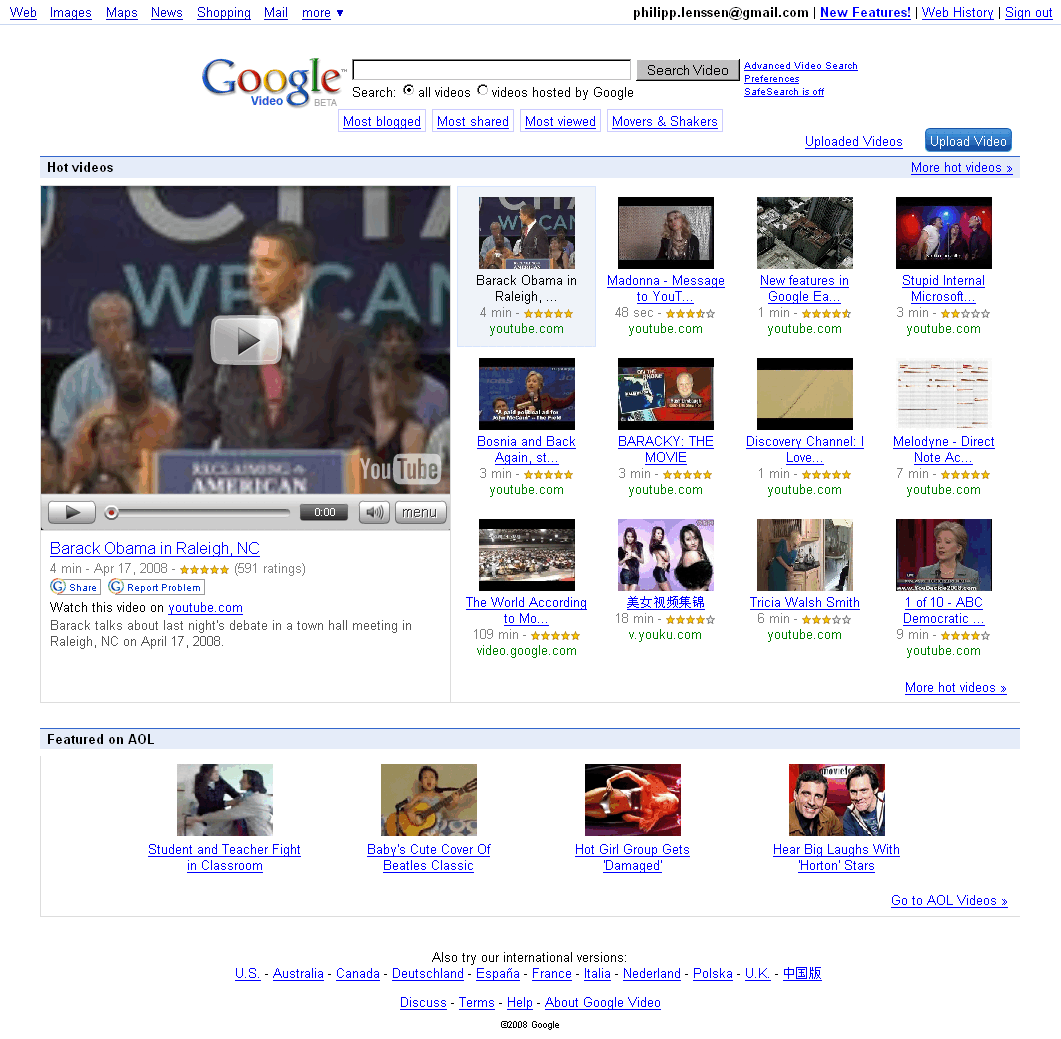
Google Video redesigned their US homepage again; above, you can see the past designs of Google Video leading to the current one*. The service started out as a video-free search service for stills and captions from TV, then became a video storage & sales site, and since last year, is a meta video search engine. The latest design recommends a couple of “hot videos,” which play in a left-side player if you click on them. “The hot video list is compiled by looking at a variety of signals including videos that most shared, viewed and blogged about,” Google says. Most of the video recommendations at the moment are from Google-owned YouTube.


Below the hot videos, another section lists videos “Featured on AOL” probably put up due to the alliance between Google and AOL; this is typical of how portal-style sites usually emphasize what their partners have to offer as opposed to what the user may really look for.


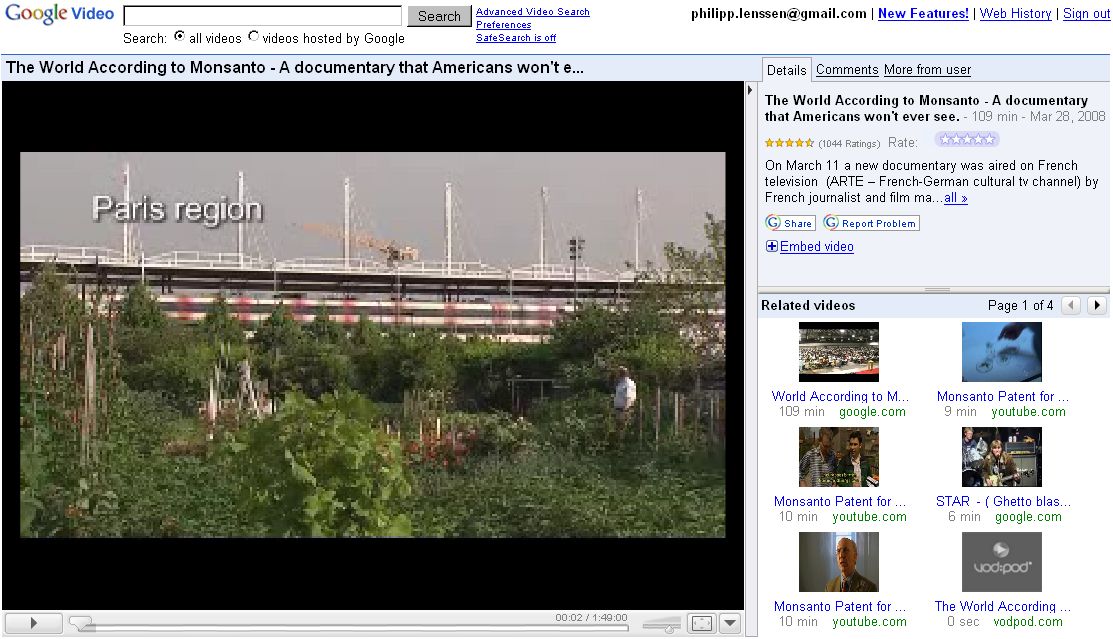
The Google Video player page has also been reorganized. It looks a bit more organized and application-like now, letting you expand and collapse its elements, and using tabs or arrow-button paging to organize comments and other features.


When you play videos from other sites, Google continues to wrap them in a frame, but Google’s part of the frame is now positioned to the left instead of the top, perhaps to not push down videos too much on the page:


Google’s frame can be closed with an X to its top right, but that won’t remove the frameset itself, so the video URL (e.g. when shared with friends) will still point to Google; you can click “original context” at the bottom of Google’s frame though to remove their frameset completely**.


I’m curious how this frame benefits Google users in the first place though. At Google images, where a similar frame is used, it serves a purpose because the target image is often buried deep down in the page, making it harder to find (clicking on the thumbnail at the top will lead directly to the image then). Usually no such obstacle is found on video result pages, though, where the video is visible immediately – perhaps making the first beneficiary of that Google frame Google Inc itself, as it makes users stay longer on their site. What’s more, Google’s “share” and “related videos” features offered in their frame are usually redundant as the target video site already offers these. (In 2004, Google co-founder Larry Page told Playboy, “We want you to come to Google and quickly find what you want. Then we’re happy to send you to the other sites. In fact, that’s the point. The portal strategy tries to own all of the information.” The 4 years that passed since then are a long time on the web.)


Google Video’s search result pages changed in this redesign, too. By default you will see a thumbnail to the left and snippet and link too the right, ordered in a list view. But now you can toggle to a grid view as well as a TV view on top. The TV view splits the page into a list to the left and a player widget to the middle right. Clicking on a result in the TV view will dynamically embed the other video sharing site’s video. While this also keeps users longer at Google Video than at other sites, this time the feature makes sense for users, as no features (like related videos, or sharing) are mirrored on the page. Video sharing sites will likely continue to add more commercials of their own right into the embedded films to make money, independent of which site the user is on. However, the end result of the TV view is not quite as fluent as zapping through TV channels at all time because partly, the external site (like tudou.com) will be very slow to load.

Upload Photos Directly to Google's Picasa with Panasonic's WiFi Camera

Panasonic (News - Alert) has introduced a new addition to its TZ-family of digital cameras, the Panasonic LUMIX DMC-TZ50, which is complete with WiFi capabilities, including standard 802.11b/g connectivity and access to T-Mobile (News - Alert) HotSpot services. Users can upload digital photos taken with the TZ50 directly to Picasa Web Albums, a free online photo sharing service from Google. The 9.1 megapixel TZ50 is packed with a 28mm wide-angle lens, 10x optical zoom and the ability to record HD video, making it the ideal digital camera for active users.


Alex Fried, National Marketing Manager, Imaging, Panasonic Consumer Electronics Company, said that Panasonic LUMIX DMC-TZ50 makes it possible for users to share their photos with friends and family with unprecedented ease and without a computer. He added that active users will appreciate the TZ50’sWiFi ( News - Alert) capabilitilies, so they can share photos while away from their PCs, but they will also benefit from HD video recording and the other advanced features of the device.

Panasonic uses the T-Mobile HotSpot service and Picasa Web Albums’ APIs to create a new optimal online environment and community for sharing digital photos. After taking photos with the new Panasonic LUMIX TZ50, users will be able to wirelessly send one or multiple photos at a time, directly toGoogle’s ( News - Alert) Picasa Web Albums. Users can connect to standard wireless home networks to T-Mobile HotSpots, which provide fast and reliable wireless Internet access at more than 8,800 public locations throughout the United States, including Borders stores, Hyatt Hotels, and many major airports.

Notably, the new TZ50 integrates the capability of recording 720p HD motion pictures together with its direct output function allowing users to enjoy watching both still and motion pictures in impressive HD quality on an HDTV via an optional component cable or by inserting the SD Memory Card into the SD slot.

The Panasonic LUMIX TZ50 also incorporates Panasonic’s advanced Intelligent Auto (iA) mode, consisting of seven intuitive technologies, Intelligent Exposure, Digital Red-eye Correction, MEGA O.I.S., Intelligent ISO, Intelligent Scene Selector, Face Detection and Continuous AF, all of which are specifically designed to help make photo-taking enjoyable and easy.

The TZ50 incorporates the Venus Engine IV, Panasonic’s new high-performance image processing LSI. The Venus Engine IV produces higher-quality pictures than its predecessor, the Venus Engine III, by using a more advanced signal processing system. The new Venus Engine IV also improves noise reduction, elevates the detection accuracy and corrective effects in both MEGA O.I.S. and Intelligent ISO and reduces the shutter release time lag.

Once a user is in iA mode, these functions happen automatically — no adjustments or settings changes need to be made. Furthermore, the DMC-TZ50 boasts an Intelligent LCD feature, which detects the lighting condition and controls the brightness level of the LCD in 11 fine steps, to offer a display with excellent clarity in any situation with the newly developed 460,000-dot high resolution in 3.0-inch LCD screen.

In its commitment to provide consumers with extensive imaging resources, Panasonic established the Digital Photo Academy, a series of nationwide workshops designed to instruct consumers how to optimize the features on their digital cameras and produce high-quality photos.

Esnatech Brings Google to Enterprise Unified Communications

The communications space has always thrived on the development of new means of communication. For a long time, that primarily meant the development of new hardware solutions to deliver new, advanced capabilities — like the mobile phone, for instance. Or it meant non-voice communications applications like email.


Now, with the emergence of advanced communications solutions that integrate fixed and mobile communications, incorporate text-based media, eliminate distance barriers, and combine multiple devices into one, the communications industry is shifting to a service and application model. Consequently, vendors are seeking new ways to integrate existing communications capabilities into a single, unified solution.

The shift to an hosted application-based model also makes possible the emergence of new players in the business communications space that have traditionally played in the data space, like Google.

Specifically, Google Applications brings the familiar Google brand into the business communications space like never before, enabling the integration of enterprise applications, telephony infrastructure, mobility, and presence data, enhancing productivity while simplifying communications.

The impact companies like Google are having in the business communications space is evident, simply from the focus on support for Google Applications from enterprise vendors likeEsna Technologies ( News - Alert).

Esnatech recently announced its support for Google Applications on its Unified Communications (News - Alert) platform, Telephony Office-LinX, a complete real-time communications solution that combines unified messaging, mobility, CTI, single number availability, IM, speech recognition, text-to-speech, Web access, and more.

By linking the enterprise PBX to Google Applications, Esnatech is enabling enterprises to leverage their investments in UC to benefit from the flexibility and convenience of already popular Google services, including messaging, collaboration, calendaring, presence, and security features.

Key features of Esnatech’s integration Google Applications include:


* Full unified messaging with Gmail and your office PBX, including message lights in the office, initiate call notification for email and fax, and the ability to log into Gmail over the phone to access, manage, and compose messages;
* Integrate Google Applications with both legacy and IP-based phone systems from popular vendors, including Mitel, Iwatsu, Nortel, AASTRA, Cisco, Avaya,Toshiba ( News - Alert), and more;
* Integrate multiple PBXs with Google Applications at the same time, required for large distributed organizations with branch offices or large campus environments
* Integration of office call logs into Gmail folders — users can then log into Gmail to see who called them and when;
* Call recording, including delivery to Gmail for full indexing and archiving;
* Click to Dial from Google Applications interface with the office PBX, including registered mobile devices;
* Import Google contacts into the Telephony office-LinX platform, allowing remote access to contacts over the phone, and also to leverage least costrouting rules of the office PBX.


Among the benefits of integrating with Google is Google’s fundamental belief that users should not be burdened by limitations of their email applications — they should never have to file or delete a message, or struggle to find an email they’ve sent or received.

By bolting Google’s hosted services onto its UC platform, Esnatech enables businesses to connect their mobile devices and office phones to Google Applications, leveraging today’s ubiquitous connectivity alternatives to access messages and information anywhere, anytime, using an application they already know.

It also means businesses are not compelled to maintain solutions from other vendors, like Microsoft, IBM, or Novell (News - Alert) — with Google Applications, they are offered an alternative that provides the same features, and greater value. Rather, by integrating services like Google Applications into their existing communications platforms, they are able to enjoy the same features and benefits, at a lower price point.

“This is like deploying a full Microsoft Exchange server, Active Directory, and Office Communication server at a fraction of the cost and with virtually no overhead,” explained Mohammad Nezarati, CEO and CTO at Esnatech. “Our UC platform integratesSaaS ( News - Alert) technology to enterprise infrastructures. The web based services of Google TM Applications also provides a complete cross platform solution. Combined with the cross platform of our Mobile UC client we can deliver UC to any and all environments.”

By eliminating the cost barrier of other solutions, Esnatech enables any business to deploy a complete solution to increase productivity and drive customer satisfaction through enhanced communications capabilities.

They don’t need a new phone system. In fact, they need not change their telephony hardware at all. Esnatech provides a simple, three-step process to launch a Unified Communications solution.


1. Connect the Esnatech Telephony Office-LinX UC platform for Google to your office phone system;
2. Subscribe to Google applications;
3. Point the Esnatech Telephony Office-LinX to your Google Domain.


Now, mobility, presence, messaging and Google Applications are instantly integrated into your office phone system, including mobile devices, for a full-featured anytime, anywhere, any device communications solution.

Good News for AJAX – The Browser Wars Are Back

After years of dominance by a single browser, Microsoft’s Internet Explorer (IE), and few advances within IE, the world has changed. There is now healthy competition among multiple browsers over standards compliance, AJAX features, AJAX performance and trustworthy computing. The competition is reaching beyond the desktop to include the emerging world of mobile browsing. This healthy competition will result in important new capabilities within AJAX toolkits and will help accelerate the adoption of Web 2.0 and Enterprise 2.0 technologies.

The Era of the Single Browser Is Over

For much of this decade, Web browsing has been dominated by Microsoft’s Internet Explorer (IE), which at its height achieved market share numbers approaching 95%, with the result that Microsoft owned a de facto standard for the Web and held effective veto power over the future of HTML. During much of this period, Microsoft suspended development of IE, with the result that virtually no new features appeared within the world’s dominant browser from 2001 to 2006.

But while IE was sleeping, one of the biggest phenomena of the computer age happened: AJAX. Clever Web developers discovered gold in them there mountains. Using AJAX techniques, Web developers could create desktop-like rich user interfaces right in the browser. Not only that, AJAX was evolutionary. AJAX offered an incremental path from the industry’s existing HTML-based infrastructure and know-how, allowing Web developers to add rich AJAX elements to an existing HTML page.

Like the California gold rush of 1949, the years of 2005-2007 saw an AJAX gold rush, where hundreds of AJAX commercial software products and dozens of open source projects came to the market. Looking back, it is truly astounding that AJAX went from an idea in 2005 to become part of the Web development mainstream by 2008.

HTML5 and the Acid Tests – Advancing AJAX and the Open Web

The HTML5 initiative, initially launched within the WhatWG and now embraced by the W3C, has turned the Web standards world from a glacial process into an avalanche of new browser features.

Today, all of the browser vendors are contributing to HTML5, and the latest major browser releases (IE8, Firefox 3, Opera 9.5, and Safari 3.1) are all shipping various features from HTML5 (and related W3C standards) in advance of formal approval by the W3C.
A companion community effort helping to accelerate the adoption of open standards is the Web Standards Project (http://www.webstandards.org), which is producing a set of “acid tests” that verify browser support for Open Web technologies, such as HTML, CSS and JavaScript. Acid2 is focused mainly on CSS support, and is now supported by Opera, Safari/WebKit, and IE. Acid3 (http://www.webstandards.org/action/acid3) tests DOM scripting, CSS rendering, SVG, and Web fonts. The first browser to pass Acid3 is the WebKit open source project (used by Safari). Due to their high visibility in the industry, the Acid tests are helping to drive browser support for open standards.

Open Source Browsers and the Mobile Web

The last few years have seen the rise of two major open source browser projects, Mozilla (the engine in Firefox) and WebKit (the browser engine on the Apple Macintosh, the Apple iPhone, Nokia phones and Google Android). In the past few years, Firefox and Safari have taken significant market share away from IE.

A related development is the growth of Web browsing on mobile phone. In the coming years, Web browsing from handheld devices will become a mainstream feature, with the result that billions of cell phone users will be browsing the Web. The WebKit open source project, in particular, is an early darling of the mobile device manufacturers. WebKit-based browsers ship on phones from Apple and Nokia, is included within the Google Android platform, the Trolltech Qtopia platform, is being ported to Windows Mobile, and has been announced for future Motorola phones. Opera browsers also have significant market share. In early 2008, Microsoft announced Windows Mobile 6, which includes a mobile version of IE6. WebKit, Opera, and IE6 all support AJAX.

IE 8 joins the browser arms race

Today, all of the browsers, including IE, are very much awake and on the move. We are seeing a new, healthy competition among the browser vendors to compete for the hearts and minds of end users and Web developers. The browsers are in a heated competition to deliver the best features and the best performance. As a result, the latest browsers have released a series of important AJAX enhancements.

After months of secrecy and industry speculation, Microsoft recently unveiled the features in the upcoming IE 8, showcasing an impressive set of new features important to the AJAX community. IE 8 includes support for several new features from HTML5 and passes the Acid2 test. Additionally, IE 8 performance for various JavaScript and DOM operations is considerably faster than IE 7.

But it isn’t just Microsoft that is on the move. Over the past few years, Opera and Firefox have been the leaders in standards support in general. Recently, Safari/WebKit has been adding major new features in rapid succession, including SVG, animations and video. Here is a partial list of new AJAX-related features that are either working today or under active development within the major browsers:
  • IE – CSS 2.1, W3C Selectors, cross-frame messaging, offline storage, and cross-domain AJAX requests
  • Firefox/Mozilla – CSS 2.1, W3C Selectors, cross-frame messaging, offline storage, cross-domain AJAX requests, Canvas, SVG
  • Safari/WebKit – CSS 2.1, W3C Selectors, CSS animations, CSS web fonts, cross-frame messaging, offline storage, Canvas, SVG, <audio>, and <video>
  • Opera – CSS 2.1, W3C Selectors, CSS web fonts, cross-frame messaging, offline storage, cross-domain AJAX requests, online/offline events, persistent connections, server-sent events, Canvas, SVG, contentEditable, and <video>

An AJAX-specific wishlist led OpenAjax Alliance

Therefore, the Open Web world already is moving quickly to advance AJAX technologies via various open standards and community processes. However, HTML5 targets a broad set of Web scenarios, where AJAX application development is just one among many target use cases.

To make sure there is good focus on the unique requirements of the AJAX community, the OpenAjax Alliance has launched an AJAX browser wishlist initiative through its Runtime Advocacy Task Force. The initiative is a wiki-based collaboration among the leading AJAX developers in an attempt to accelerate the delivery of browser enhancements needed by the AJAX community.

Beyond just a feature list, the Runtime Advocacy initiative supplements each feature request with supplemental technical details, such as explanations of why exactly a particular feature is required, along with suggested technical approaches, and discussion comments from industry leaders about the preferred technical strategies for delivering each particular feature.

But perhaps the most important aspect of the OpenAjax browser wishlist is the voting process, where the participants assign priority rankings to the various features. These rankings will inform the browser vendors not only which features are most critical to Web developers, but also allows them to see which parts of the AJAX community are requesting a particular feature and why developers feel the feature is critical.

The first release of the OpenAjax browser wishlist will happen in the mid-summer 2008 timeframe, which we believe will align with the planning processes within the browser vendors for their next major browser releases (presumably, Firefox 4, IE 9, Opera 10 and Safari 4). Here is the full schedule for the AJAX wishlist initiative:
  • April 2008 - Phase I review, where participants not only add comments, but also are asked to identify their Top 5 features (i.e., those features that are most critical for inclusion in next-generation browsers).
  • May 2008 - The moderators reorganize and possibly trim away feature requests for which little interest was shown.
  • June 2008 - Phase II review, where participants will be asked to provide importance ratings for each of the feature requests on a scale of 0.0 to 5.0.
  • July 2008 - The moderators will produce a summary report and notify the major browser vendors about the results.

Who can participate and how to join the effort

For the browser wishlist initiative, the alliance is reaching out to leading AJAX toolkit developers and other technical experts in AJAX application development.
The first wave of participants have been representatives from many of the leading AJAX toolkits. Among the AJAX toolkits and industry experts who have contributed to the effort in its early stages are ASP.NET AJAX (Microsoft), Dojo Toolkit, Douglas Crockford (of JSON fame), DWR, Ext JS, jQuery, Prototype.js, Spry (Adobe) and XAP.

The alliance also wants to reach out beyond the AJAX toolkit providers to leading AJAX developers, particularly Enterprise developers. Anyone from the community can participate in this effort, whether a member of OpenAjax Alliance or not. Instructions for how to join the effort can be found on the main wiki page for the initiative (http://www.OpenAjax.org/runtime/wiki). Once you have a wiki login, you can freely modify existing feature requests, add new feature requests, and vote for which features are most critical.

Some of the features requested so far

The table below shows some of the features from early versions of the wishlist, before voting and prioritization:

Some early entries in the OpenAjax Alliance Browser Wishlist
Security
Better security for cross-site scripts, stronger protection against cross-site request forgery, enhanced security for IFRAMEs
Communications
More than 2 HTTP connections per window, persistent connections (to support Comet)
HTML5/W3C
2D graphics, video, audio, offline, mutation events
Rendering and interactivity
Better APIs for positioning and styling, improved layout support, better support for rich text editing, better support for drag/drop and copy/paste
Other
AJAX toolkit caching, JavaScript pause/release

What we hope to accomplish

The wishlist is focused on identifying higher-level requirements (e.g., offline support, better APIs for positioning and styling) instead of requesting specific solutions. Our assumption is that the browser teams and the relevant standards efforts (e.g., HTML5) will work out the technical details in order to address the requirements from our wishlist.

We don’t expect agreement among the contributors. Different people have different requirements and differing technical vision. The important thing is to capture the various points of view so that the browser teams and the HTML5 standards effort have the best possible information from which they can work out the details.

What this means to AJAX

The healthy, fast-paced competition that we are seeing among the leading Web browsers delivers three main benefits to the AJAX developer community:
  1. Better interoperability, which translates into increased innovation – As newer version of browsers support open standards more completely and reliably, and as older machines are retired, the AJAX toolkit vendors can innovate more quickly as they spend less time working around incompatibilities and bugs.
  2. Better performance, which translates into more power and greater scalability – The healthy performance battle taking place today among the browser vendors will enable future versions of AJAX toolkits to deliver new features that were not feasible in older, slower browsers (particularly IE6, which is infamous in the AJAX developer community for its performance shortcomings).
  3. New browser features, which translates into new types of applications – Many of the features coming in recent Web browsers will enable major advances the features that will be available to AJAX developers. Offline features will enable AJAX applications to run even when disconnected from the network (e.g., in an airplane). The cross-frame messaging and cross-domain AJAX request features will help deliver secure mashups at high performance. The vector graphics, animation and video features will allow seemless integration of rich UI experiences and multimedia, without having to bridge between the Open Web and proprietary platforms.

About the Alliance

The OpenAjax Alliance is an organization of vendors, open source projects and companies using AJAX that are dedicated to the successful adoption of open and interoperable AJAX-based Web technologies. The alliance’s prime objectives are: accelerate customer success with AJAX by promoting a customer's ability to mix and match solutions from AJAX technology providers, educate the AJAX developer community about how to use AJAX technologies and techniques successfully, and help drive the future of the AJAX ecosystem. The browser wishlist is one of the key initiatives at the OpenAjax Alliance towards helping to shape the future of the AJAX ecosystem. Other OpenAjax initiatives address AJAX toolkit interoperability (OpenAjax Hub 1.0 and OpenAjax Registry), secure mashups (OpenAjax Hub 1.1), IDE standards and widget standards (OpenAjax Metadata), activities related to AJAX security, and activities related to Mobile AJAX.

Collaborate Using Online Tools

As journalists go, I am usually ridiculously organized (I procrastinate by rearranging my desk or home office). Lately, though, the sheer number of projects I'm handling--along with messages and appointments coming from three different e-mail accounts--has threatened to overwhelm me.

Compound this deluge by the fact that my role at a high-tech consulting company means I don't exactly work in a vacuum. Even though I'm miles away from most of my colleagues or clients, I need a way to share pertinent documents, presentations, and proposals with other people. Even more important, I need to track my due dates, and where my extended team is working (or playing) at any given moment.

Do these problems sound familiar?

The good news is, there's a whole new class of services aimed at small businesses that need to better support team collaboration and project management functions. Search the Internet for "online collaboration," and you'll see dozens of results returned. I've honed those choices to a handful of services--Basecamp, Central Desktop, Google Sites, HyperOffice, Sosius, Twiddla, and Vyew. These services have a true small-business bent and aren't simply the online editions of existing enterprise software packages. (PC World has reviewed various types of collaboration services and packages.)

When it comes to choosing which service to use, you'll want to consider four main capabilities: (1) how well you can manage all the projects you're juggling through some sort of team dashboard; (2) whether you can hold online conferences, complete with visual conferencing capabilities; (3) how easy the service makes the process of sharing and revising the project's shared resources and documents; and (4) how quickly team members can communicate updates as well as update their shared calendars.

Fortunately, all of the sites here offer a free trial of some kind, so you can try out various features before you commit to a monthly or an annual subscription.

Keep Things Straight With Dashboards

Sosius Dashboard--click for full-size image.

Most online collaboration services employ a browser-based central dashboard that provides an overview for navigating your work existence. This dashboard is, in turn, organized by "workspaces." You can think of a workspace as a spot with all the resources necessary for a team to keep pushing a specific project forward, such as schedules, updates on project milestones, central document repositories, and a place to record team comments and observations. Dashboards help you keep a handle on multiple projects.

Security is also a consideration: Workspaces can either be private, gated for just a specific set of people, or made public for a broader community to share.

Above is an example of the overall dashboard from Sosius--it's one of the most customizable, allowing you to add different applications and work areas or to move them around to wherever you'd like them to be. (Click on this and the other thumbnails for full-size images.)

Central Desktop--click for full-size image.

Central Desktop and Basecamp, by contrast, make use of a tabbed interface. Central Desktop even lets you build out custom tabs, allowing you to create and define new tabs that are specific to your unique projects rather than relying only on what's already predefined. And Central Desktop's site is peppered with useful demonstration videos that walk and talk you through the steps to complete common tasks--a definite plus.

To return to the Sosius interface for a minute: One thing I really liked about it was that I could move different applications around or reprioritize them by dragging and dropping them. That means I was able to organize things according to how I think and work rather than deal with them in the order that some interface designer tells me they should be in. Other services allow you to make such tweaks, too; the point is, you should look for the flexibility you need in the interface of any collaboration offering that you might use.

Google Sites--click for full-size view.

Google Sites considers each collaborative workspace as an intranet, and it provides templates for you to design and pull together an intranet that's appropriate for your project. The Docs application within the service is where you can shuttle content around for review.

One big advantage of Google Sites is that it can appear less cluttered than some of the other collaboration offerings. On the other hand, a disadvantage is that each individual project is treated as something very stand-alone, making things a little tougher for those of us handling multiple projects at once.

Get a jump on the web

CASH-strapped small businesses know a website will open them up to the world - but too often they skimp on marketing and it fails.

Internet expert Jasmine Batra said it did not have to be so difficult.

"A website can be such a level-playing field and small business can compete against the big corporates," she said.

Ms Batra, the director of Arrow Internet Marketing, said there were measures businesses could take to optimise their presence on the internet.

Her own company was ranked first for searches on google.com.au for "SEO (search engine optimisation)company" thanks to clever use of optimisation.

Ms Batra said experts could identify what people were searching for and how best the small business could tap into that demand.

One step was to find out what search words people were using when looking for goods or services.

It helped, she said, to put yourself in their shoes. For instance, were people searching for "used baby goods" or "second hand baby goods".

She said when websites were developed they generally had access to tools to track who was visiting the site.

Traffic statistics can not only show how many people are visiting but how long they stayed.

Ms Batra said people should look at this information at least once a month.

"I like to look at my traffic stats every week," she said.

"There are lots of insights in them. If you were running a retail store you would be interested to know how many people walked in the door."

She said people could install Google Analytics which would help them find out where their visitors were coming from and how they interacted with the site.

She said it also was important to manage the content of the site, keeping it up-to-date and relevant.

Google has more than 300 criteria when ranking websites. Blogging, RSS feeds and repeating key words were all advantageous and would optimise a site.

It was pointless for a business to spend a lot of money on a site and not market it Ms Batra said.

"They need to be spending money on the online marketing of the site as well," she said.

It was also important to identify your target market.

If, for example, you were targeting Generation Y, you might be interested in pursuing bookmarking and social networking sites such as MySpace, Flickr and Del.ici.ous.

"There are a lot of opportunities to make the most of it," she said.

She said some businesses might find Pay Per Click promotions, such as Google AdWords, effective.

Businesses might like to run Google Adwords in the short term, at particular times of the year in their business cycle.

But she said it was important for businesses to know how much the service was costing them and how much it cost to get each client or sell each product.

Some clients offering professional services had found Google AdWords beneficial.

Ms Batra said one of her clients, which sold solar panels, had been able to work out that using AdWords it cost it $30 to sell a $1500 panel.

Google Moon

In case you’ve never checked out Google Moon or don’t even know about it, it’s a lot of fun if that sort of thing interests you. To me, this little world in a gravitational dance with the Earth, about which so much is still not known, is a mysterious and fascinating place, and perusing its surface via Google Earth is almost addictive.


Here’s a site with extensive lists of named lunar features, which you may utilize in Google Moon to explore the surface of our satellite.


Google Docs Offline and Google Reader Offline

Over the past few days I have been playing with Google docs offline app, and I must say Im quite impressed. The ability isn’t there to create new docs while offline, so I would recommend you create a few blank templates for offline access.

I can’t wait for the day Im going to be able to use Google apps for everything. if you dont know about it by now I guess you can read about it here, Google has made their apps available for offline use with Google gears plugin and firefox, there is also a internet explorer version.

While playing with Google gears I also noticed that Google reader also has an offline feature which I find very cool, see screen shot below.

Google Reader Offline Syncing

I find this cool feature of offline rss feeds great, I can sync my content, go off line and read my feeds while not online, go back to a location were I have internet access and re-sync the app, to update read posts, and get new feeds.

I will be playing with all of Googles new hidden features, and post updates, stay tuned!

Wednesday, April 16, 2008

IMAP And Ajax UI Temporarily Go AWOL On Gmail

t happened all at once today (and maybe that's why Gmail is still in "beta" after all these years). Both the Web interface and my various e-mail clients (Outlook, my smartphone) that were accessing my enterprise Gmail account seized up on me completely. Standalone Gmail account holders were affected, too (according to a blogsearch on the matter). The cause? An AWOL IMAP interface caused the mail clients to clam up and most of Gmail's Ajax-like functionality vanished at the same time, causing serious browser indigestion. What are the implications?

The timing couldn't have been worse, given the recent execution of a SaaS tag-team powerplay by Google and Salesforce.com, both of whom are in the market with the message that you don't need local software to get the job done. Prior to that announcement, Salesforce.com played nicest with Outlook. But now, with seamless integration into Google applications like Gmail and Google Calendar, there are no doubt some shops that will look into ditching Outlook (a baby step for some toward ditching Microsoft Office or Microsoft altogether).

I won't opine on the ditching MS angle. Outlook, as it turns out, is actually the best e-mail client for accessing Gmail through Gmail's IMAP interface, as long as it's up. One reason for this is the way Outlook integrates mail and calendaring (how I wish Thunderbird or MacMail would do this). Outlook also is more deft than the other two at transparently switching into an offline mode if the need arises (like your Wi-Fi goes on the blink, which mine occasionally does).

But no mail client is going to handle what happened today very gracefully. If the mail client is looking for imap.gmail.com to retrieve its mail and imap.gmail.com is gone (which it was), you're going to get errors. Not only did Outlook spit out errors. So, too, did my browser interface to Gmail (I keep it active because it's faster at searching my e-mail).

At first, I couldn't figure out why Firefox choked because my accounts seemed to be accessible via Safari. But, upon closer inspection, all the highly interactive Ajax-y features in the Gmail interface that I've grown to know and love were gone as well. Safari was showing me what appeared to be the old, blocky, very text-oriented interface to Gmail. That might explain why Firefox choked. My current "page" had Ajax code on it, but there was probably nothing on the Google end of things transmitting or receiving the messages that keep Ajax interfaces so active. Logging Firefox out of Gmail and back in again eliminated the seizure, but I still had the old, blocky interface that Safari was showing.

I've got messages into my contacts at Google to find out what happened and will report back here once I found out more.

But, what are the implications? Somewhere at some business where all the users were tying into a Google Apps-based version of Gmail, someone's phone probably started ringing off the hook. Maybe it was the CFO or the CEO who set his/her entire company up with Google Apps because of how easy it is to do (it's VERY easy) and how s/he's avoiding all sorts of costs associated with running something like Microsoft's Exchange Server or Lotus Notes (including the people needed to run those things).

But today comes the flip side to the argument. Something goes haywire at Google (there was no announcement, warning, or post to the official Gmail blog before this happened) and what would that CFO or CEO do next? Basically, there's nothing s/he can do about it except wait until Google fixes it (I thought of switching my clients to Gmail's still-active POP interface until the IMAP interface was fixed, but that is most definitely not a good idea).

Even more of a challenge for CxO's taking the Google, Salesforce, et alia shortcut (a shortcut I still favor, by the way), is what happens if applications like Gmail and Salesforce are integrated into each other in a way that a failure of one stifles the functionality of the other.

Have some thoughts on this? Did you experience the outage differently than I did? Feel free to comment below.